
Appearance
What your client sees
The quote page from your client's side, and what they can do on it.
When you email a quote, your client gets a link to their own copy of it. They don't need a HiTradies account or a password — the link just opens.
You can see the same page yourself any time with Preview on the quote, or More actions > Client portal.
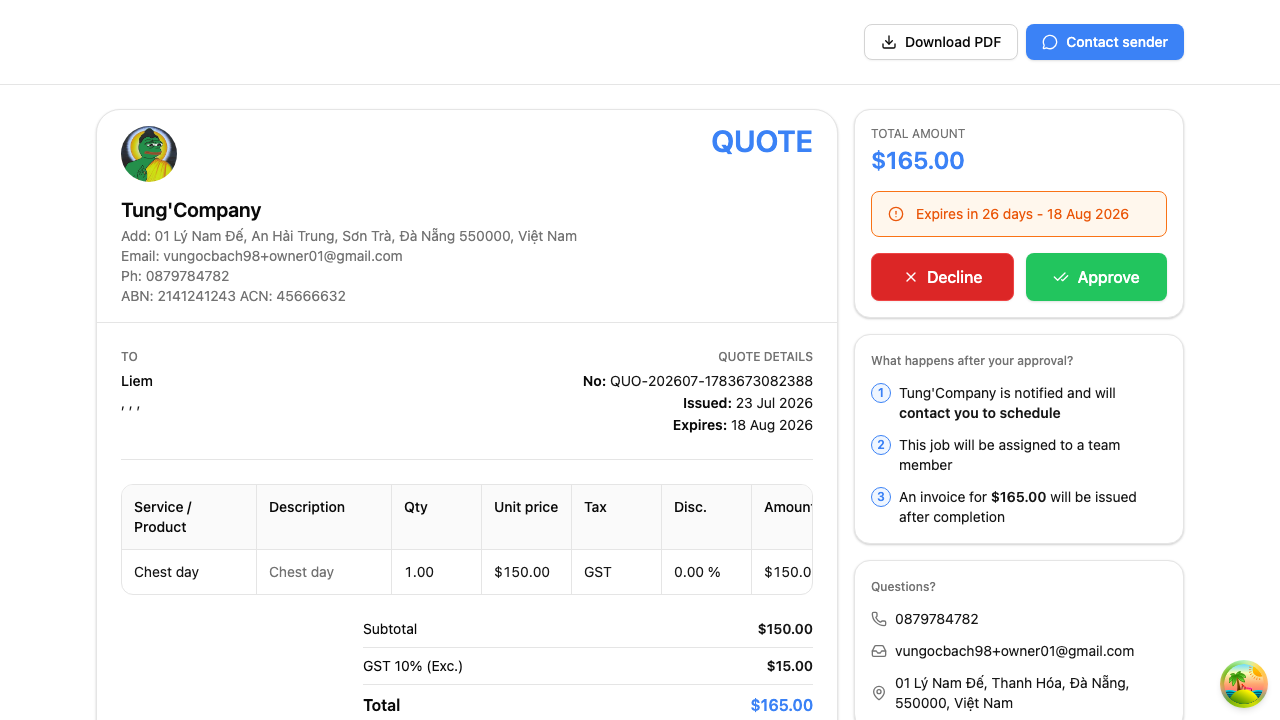
What's on the page
- The full quote — your business details, their details, every line you've priced, the totals and your message
- A Download PDF button, so they can save or print it
- A Contact sender button for questions
- Down the side: the total, how long the quote is valid for, and two big buttons — Approve and Decline
When your client approves
They select Approve, check the summary in the confirmation window, and select Approve quote.
The quote's status changes to Approved straight away, and HiTradies records who accepted it. You can then turn it into a job.
When your client declines
They select Decline and pick a reason:
- Price is too high
- Not within budget
- Timeline is too long
- Services are not needed
- Found another provider
- Project has been cancelled
- Other
The quote's status changes to Declined. The reason is useful — if "price is too high" keeps coming up, that's telling you something.
When your client has a question
Contact sender opens a message box where they can write to you instead of approving or declining. When they send it, the quote moves to a Changes Requested status so it's easy to spot, you're notified (by email and in-app), and their message is saved to the quote's activity. Nothing is locked in — you can edit the quote, resend it, or mark it approved or declined once you've sorted things out. Contact sender is only offered while the quote is still awaiting an answer.
Getting a copy for yourself
Download PDF is on this page for your client, and also on the quote itself under More actions — handy for attaching to your own records.